
Everything about Error Handling in Combine
A deep dive into error handling techniques in Combine, including practical examples and best practices.

In the previous article, while discussing the 5 essential caveats to remember to master Combine, we touched upon error handling briefly. In this article, we will dive deep into error handling in Combine, covering everything there is about built in error handling in Combine.
This article is part of a series where I dive deep into iOS concepts, exploring the smallest details often overlooked by typical articles. I aim to blend definitions with practical insights for a clear and actionable understanding. Whether you're a seasoned developer or eager to learn, this series will provide the insights and skills needed to master these powerful frameworks. Let’s get started.
Getting Started
In Combine, the Publisher protocol is the core building block. It has two associated types: Output and Failure. In this article, we’ll focus only on the Failure aspect of it.
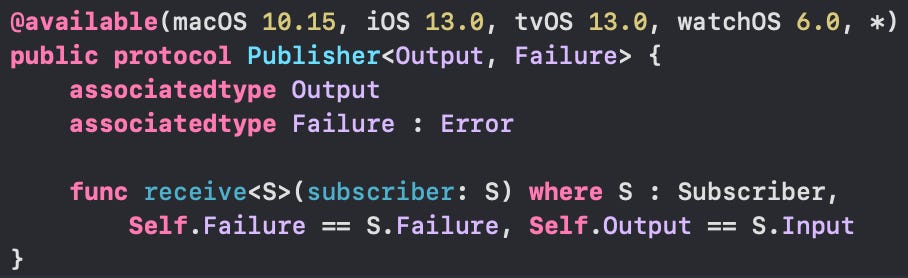
The associatedtype Failure represents the type of error that a given publisher can emit. The Failure type must conform to the Error protocol. This allows Combine to handle errors in a type-safe manner.
If a publisher does not emit errors, you should use Never as the Failure type.
Core Concepts of Failure
What happens when a Publisher emits Failure?
Let’s define our own CustomError as follows, which we will use throughout:
enum CustomError: Error {
    case invalidArgument
    case unknown
}
Let’s now create a publisher that emits Failure. Here, we’ve initialised Fail operator with our CustomError.
Fail creates a publisher that immediately terminates with the specified failure.
var cancellable = Fail<Int, CustomError>(error: CustomError.unknown)
    .map { value in
        print("inside Map")  // <----- Skipped
        return value
    }
    .sink { completion in
        print(completion)
    } receiveValue: { value in
        print(value)
    }
As expected, the map operator following the Fail operator is not executed and the chain terminates with the below output
Output:
failure(__lldb_expr_12.CustomError.invalidArgument)
So what happens when a publisher emits Failure?
When an upstream publisher throws an error, the default behaviour given the error handling operators are not used is as following:
When a publisher emits a failure, it will cancel itself and stop publishing immediately!
The publisher sends a cancel event to all the upstream publishers, cancelling all publishers upstream. (This gets evident when you add handleEvents operator in your chain.)
The failure message will be passed downstream, and operators that handle errors will process this failure, propagating it all the way to the final subscriber. (Downstream publishers that expect success gets skipped.)
This will result in the chain completing with a Subscribers.Completion.failure enum.

📝 As the upstream publishers are cancelled, note that the publishers will no longer emit values. So, even if you repackage your Failure into Output, this will only impact your downstream subscribers, and how the chain completes.
📝 Always remember that the operators that expect a success from upstream, skip execution whenever when there is an upstream Failure.
Handling Errors
Instead of looking at various operators in isolation, let’s break down error handling into different use cases you might encounter. For each use case, we'll explore various equivalent approaches that you can take.
We can broadly break down the general use cases into the follow categories:
Terminate Execution on Failure
Transform Failure to different Failure and terminate chain
Transform Failure to Output and terminate chain
Transform Failure to Ouptut and continue chain
Retry Failure
We will use the code snippet below to test the above use cases. Here is a link to the Gist.
| let userAge = [21, -1, 27] // We'll validate if the age is valid; > 0 | |
| var cancellable = userAge.publisher | |
| .handleEvents(receiveSubscription: { s in | |
| print("Received subscription: Ages ", s) | |
| }, receiveOutput: { o in | |
| print("\nReceived publisher output: ", o) | |
| }, receiveCompletion: { c in | |
| print("Received completion: ", c) | |
| }, receiveCancel: { | |
| print("Received cancel.") | |
| }, receiveRequest: { d in | |
| print("Received request: ", d) | |
| }) | |
| .tryMap { value in | |
| print("Inside tryMap for: ", value) | |
| guard value > 0 else { | |
| print("Throwing for \(value) as age cannot be negative") | |
| throw CustomError.invalidArgument | |
| } | |
| return value | |
| } | |
| .map { value in | |
| print("\nInside map after tryMap for: ", value) | |
| return value | |
| } | |
| .sink(receiveCompletion: { value in | |
| print("\nSink Completion: ", value) | |
| }, receiveValue: { value in | |
| print("Sink Value: ", value) | |
| }) |
Note: Downstream publishers that expect a Failure type will execute regardless of upstream errors. When I use the term "Terminate" in the context below, I am referring specifically to operators that expect an Output.
Use case #1: Terminate Execution on Error
You want the execution to terminate immediately on error, skipping the downstream subscribers and completing with a Subscribers.Completion.failure enum.

Desired Output based on the requirement:
Received subscription: Ages  [21, -1, 27]
Received request:  unlimited

Received publisher output:  21
Inside tryMap for:  21
Inside map after tryMap for:  21
Sink Value:  21

Received publisher output:  -1
Inside tryMap for:  -1
Throwing for -1 as age cannot be negative
Received cancel.

Sink Completion:  failure(__lldb_expr_173.CustomError.invalidArgument)
Notice how the publisher is terminated as soon as Failure is thrown.
Approach:
This is the default behaviour. The upstream Failure event passes through unchanged to the final subscriber without modification, and no additional operators are needed.
On running the previous Gist code example without modifications, we get the desired output which is the default behaviour
As you can see, cancel is called immediately after the Failure occurs. This causes the chain to terminate instantly with a Failure completion.
Use case #2: Terminate, and change the Failure type
Your requirements are the same as in Use Case #1 (terminate execution immediately on error), but you also want to change the Failure type. For example, you might map it to your own CustomError type.
In our Gist example, we want to replace the current CustomError with UserError, while preserving the default behaviour. Specifically:
If the
CustomErrorwasunknownearlier, the correspondingUserErrorshould betryAgain.If the
CustomErrorwasinvalidArgumentearlier, the correspondingUserErrorshould beinvalidInput.
The code should complete with a Failure, and the output should reflect that the Failure type is now UserError.
Desired Output based on the requirement:
Received subscription: Ages  [21, -1, 27]
Received request:  unlimited

Received publisher output:  21
Inside tryMap for:  21
Inside map after tryMap for:  21
Sink Value:  21

Received publisher output:  -1
Inside tryMap for:  -1
Throwing for -1 as age cannot be negative
Received cancel.

Sink Completion:  failure(__lldb_expr_177.UserError.invalidInput)
Notice the type of Failure thrown in sink. It’s no longer CustomError
Approach:
The code snippets below can be added after .tryMap in our Gist example. They are all equivalent and will generate the desired output:
1. mapError(_:) operator:
Converts the upstream error to a new error type. It accepts the upstream failure as a parameter and returns a new error for the publisher to terminate with.
Example: Now add the below mapError operator after tryMap in the previous example. (We’ll dive deep into why there is an optional caste for CustomError in the next section of this article.)
.mapError { error in
    let error = error as? CustomError ?? .unknown
    switch error {
    case .unknown:
        return UserError.tryAgain
    case .invalidArgument:
        return UserError.invalidInput
    }
}
When you make the above changes and check the output, you’ll see that a UserError, a new type of error, is thrown as expected.
2. Throwing within tryCatch(_:) operator:
You can also achieve the current use case requirement by throwing a different error type within the tryCatch block.
.tryCatch { error -> AnyPublisher<Int, UserError> in
    let error = error as? CustomError ?? .unknown
    switch error {
    case .unknown:
        throw UserError.tryAgain
    case .invalidArgument:
        throw UserError.invalidInput
    }
}
The output generated will be the same as the desired output.
Use case #3: Continue Execution Downstream and Complete with .finished
You want to continue the execution of the downstream subscribers and have the chain complete with Subscribers.Completion.finished, even if an upstream error occurs.

Desired Output based on the requirement:
Received subscription: Ages  [21, -1, 27]
Received request:  unlimited

Received publisher output:  21
Inside tryMap for:  21
Inside map after tryMap for:  21
Sink Value:  21

Received publisher output:  -1
Inside tryMap for:  -1
Throwing for -1 as age cannot be negative
Received cancel.

Inside map after tryMap for:  0
Sink Value:  0

Sink Completion:  finished
Notice how, despite repackaging the error into a success, the cancellation is still triggered. Additionally, as a side effect of the Output, the final map block also gets executed.
Approach:
The code snippets below can be added after .tryMap in our Gist example. They are all equivalent and will generate the desired output:
1. replaceError(with:) operator:
Replaces the upstream error with an Output value, allowing the downstream chain to continue and complete with .finished.
.replaceError(with: 0)2. catch(_:) operator:
Handles the error and provides a new publisher that emits a successful value, allowing the downstream chain to continue.
.catch { _ in
    Just(0)
}
3. Return within tryCatch(_:) Operator:
Handles the error and returns a new publisher to continue execution with a successful value.
.tryCatch { _ in
    Just(0)
}
Use Case #4: Continue Execution Downstream and Prevent Chain Termination
On Failure, you want to continue as if nothing happened. You neither want to cancel upstream publishers nor let the chain cancel or terminate. (this is a hacky approach; the chain still dies but within context).

Desired Output based on the requirement:
Received subscription: Ages  [21, -1, 27]
Received request:  unlimited

Received publisher output:  21
Inside tryMap for:  21
Inside map after tryMap for:  21
Sink Value:  21

Received publisher output:  -1
Inside tryMap for:  -1
Throwing for -1 as age cannot be negative
Inside map after tryMap for:  0
Sink Value:  0

Received publisher output:  27
Inside tryMap for:  27
Inside map after tryMap for:  27
Sink Value:  27

Received completion:  finished
Sink Completion:  finished
Notice how the despite the error, the publisher is not cancelled and continue execution and it finishes normally.
Approach:
Nested flatMap operator:
Use a nested flatMap to handle errors by emitting a new publisher that continues execution. Since flatMap is non-throwing, you can nest the entire throwing publisher within this block and manage errors inside the flatMap operator.
.flatMap { value in
    Just(value)
        .tryMap { value in
            print("Inside tryMap for: ", value)
            guard value != 0 else {
                print("Throwing as condition failed.")
                throw CustomError.invalidArgument
            }
            return value
        }
        .catch { error in
            Just(2)
        }
}
How does this work?
.catch()terminates the upstream publisher and replaces it with the publisher provided as its argument. This results in a.finishedcompletion when usingJust()as the replacement publisher.Inside
.flatMap, you replace the publisher with a new one, so the termination of the original publisher by.catch()does not affect the replacement publisher. Thus, the original upstream publisher remains unaffected.
Use Case #5: Retry on Failure
On Failure, you want to retry few more times before passing on the Failure to the downstream publisher.

Desired Output based on the requirement:
Received subscription: Ages  [21, -1, 27]
Received request:  unlimited

Received publisher output:  21
Inside tryMap for:  21
Inside map after tryMap for:  21
Sink Value:  21

Received publisher output:  -1
Inside tryMap for:  -1
Throwing for -1 as age cannot be negative
Received cancel.

Received subscription: Ages  [21, -1, 27]
Received request:  unlimited

Received publisher output:  21
Inside tryMap for:  21
Inside map after tryMap for:  21
Sink Value:  21

Received publisher output:  -1
Inside tryMap for:  -1
Throwing for -1 as age cannot be negative
Received cancel.

Sink Completion:  failure(__lldb_expr_201.CustomError.invalidArgument)
Notice how the subscription connection is established twice before the error is finally thrown in the Sink completion.
Approach:
retry(_:) operator:
Use retry(_:) to try a connecting to an upstream publisher after a failed attempt.
To achieve the desired output, we first need to extract the throwing block into a separate publisher variable.
We then apply the
retryoperator to this publisher. If the publisher emits a Failure,retrywill reattempt the connection with the upstream publisher for the specified number of retries.
publisher.retry(1)Additional Key Concepts in Error Handling
1. setFailureType(to:)
Say, you are using Combine’s merge publishers such as - merge(with:), zip(_:) etc. (We won’t dive deep into the implementation of these, maybe some other article)
The first publisher emits <Int, Never> whereas the second publisher emits <Int, CustomError>. Can you tell what’s wrong in the below code?
let pub1 = [0, 1, 2, 3, 4, 5].publisher
let pub2 = CurrentValueSubject<Int, CustomError>(0)
let cancellable = pub1
    .combineLatest(pub2)
    .sink(
        receiveCompletion: { print ("completed: \($0)") },
        receiveValue: { print ("value: \($0)")}
     )
When combining publishers, operators expect the publishers to emit the same failure type. If different error types are emitted, the code will fail. The compiler is smart enough to catch this error.
But, why does this happen?
Operators enforce this check to maintain type safety, ensuring a single type of error is emitted from a publisher. At any point in the chain, the type of Output and Failure should be determinable. Otherwise, an error will be thrown.
How to solve this?
Combine provides a built-in operator for such scenarios: setFailureType(to:).
setFailureType(to:) changes the failure type declared by the upstream publisher. This is used for setting the error type of a publisher that cannot fail.
In the above example, adding this operator after pub1 will resolve the error.
.setFailureType(to: CustomError.self) 2. try* operators
You must be familiar with the try* variant of operators.
In our example for mapError above for Use case #2, you can notice that we had to optionally caste the error into our CustomError type. The compiler otherwise complained that it could not identify the type
But, why did this happen?
These operators can emit either an
Outputor aFailureSwift doesn’t support typed throws yet. This means when you use
try* operators, your error type will always be erased to the most common ancestor:Error.Thereby need the optional type caste into our desired
Errortype.As we’ve already looked into above,
mapErrorhandles this use case perfectly.
3. assertNoFailure operator:
When you’re sure that the given programming path cannot throw an Error, you can use assertNoFailure(_:file:line:).
It raises a fatal error when its upstream publisher fails, and otherwise republishes all received input.
As per Apple documentation: Use
assertNoFailure()for internal integrity checks during testing. However, similar tofatalError(_:)in Swift,assertNoFailure()will trigger a fatal exception in both development and shipping versions of your code if a failure is encountered.Strictly avoid this in production code as this is unsafe and makes assumptions. Use safer techniques discussed earlier.
And, that’s a wrap.

These are the built-in error handling operators supported by Combine. You can mix and match these operators to suit your specific use cases.
In our next article, we will explore the nuances to keep in mind while creating a custom Publisher, including a custom publisher that will retry a given publisher up to a specific times and based on if whether the given condition is met. If you’re feeling adventurous, try this exercise and hit me up!
If you found this helpful, click the 💚 and give it a clap below so others can discover it on Substack. For any questions or suggestions, feel free to leave a comment or reach out to me on Twitter or LinkedIn.
Let's push the boundaries of iOS development together!
References: